Best Gaming Keyboard 2026: Expert Picks for Performance and Comfort
Best Gaming Keyboard 2026: Expert Picks for Performance and Comfort

Gaming keyboards give you faster response, clearer feedback and more customisation than standard keyboards. They range from compact tenkeyless boards for tight desks to full-size models with number pads, wrist rests and RGB lighting. Mechanical switches, durable keycaps and programmable keys help players aim, cast spells and communicate faster, while quieter membrane options suit shared spaces.
When choosing a gaming keyboard, prioritise switch type, build quality and key rollover (anti-ghosting). Consider layout and size to fit your desk, and check software for macros and lighting controls. Battery life matters for wireless models, and comfort features like wrist rests reduce fatigue during long sessions. We tested a variety of sizes, switches and price points to find keyboards that give precise input, reliable durability and useful features for different kinds of gamers, so you can move on to our picks and detailed buying guide.
Best gaming keyboards
Below is our full list of the best gaming keyboards we recommend. We tested options for build, feel and features to help you find the right keyboard for your play style.
Apex Pro TKL Gen 3

We recommend this keyboard if you want top-tier responsiveness and lots of adjustable settings for competitive play.
Pros
- Ultra-fast, adjustable switches for very quick inputs.
- Built-in OLED and presets make switching settings easy.
- Durable PBT keycaps and quieter typing feel.
Cons
- Very sensitive at low actuation can cause accidental presses.
- Advanced features add complexity for casual users.
- [TKL layout](https://gaminggiz.blogspot.com/2025/12/The Huntsman V3 Pro TKL a brief introduction.html) removes the number pad, which some need.
The OmniPoint 3.0 Hall Effect switches let us tune actuation from nearly a brush to a deeper press, so we can favour speed or precision depending on the game. Rapid Trigger and Rapid Tap aim to reduce missed inputs and boost responsiveness in quick moves.
GG QuickSet and the OLED screen cut down on software fiddling by offering ready-made profiles. We can change settings without leaving the game, which saves time during sessions.
Protection Mode helps reduce accidental keypresses around the one we press, but relying on very low actuation still risks mistakes unless we fine-tune. The TKL form suits many esports setups but may frustrate users who need a numpad.
Overall, this keyboard targets competitive players who want customisability and fast input. If we prefer plug‑and‑play simplicity or need a full-size board, we might look elsewhere.
AULA F75 Pro

We think the AULA F75 Pro is a solid buy for gamers who want hot‑swappable switches, tri‑mode wireless and strong RGB value.
Pros
- Hot‑swappable switches make customising easy.
- Tri‑mode connection and big battery suit multi‑device use.
- Thick sound dampening and pre‑lubed stabilisers give a quieter, smoother feel.
Cons
- Plastic case may feel less premium than metal alternatives.
- Knob or controls can be slow to respond for some users.
- Compact 75% layout may need time to get used to for full‑size users.
The F75 Pro packs a lot of features into a compact keyboard. Its hot‑swap PCB and pre‑lubed switches let us change the feel without soldering. The side‑printed PBT keycaps resist wear while letting the RGB shine through.
Wireless options include Bluetooth 5.0, 2.4GHz dongle and wired USB‑C, so we can switch between devices quickly. The 4000mAh battery and media knob help for long sessions, though some users report the knob’s responsiveness is not perfect.
Build-wise, the keyboard uses layered silicone dampening to cut cavity noise and improve key feel. That makes typing and gaming quieter and more solid, even if the shell is plastic rather than metal.
We recommend the AULA F75 Pro for players who want a feature rich, small form‑factor keyboard that’s easy to mod and great for RGB ambience. If you need a metal case or full‑size layout, consider other models.
Buy on Amazon: AULA F75 Pro Wireless Mechanical Keyboard
ASUS ROG Scope II 96

We recommend this keyboard if you want a compact layout with full-number-pad functionality and strong wireless options.
Pros
- Compact 96% layout keeps a number pad while saving desk space.
- Fast tri-mode wireless and long battery life for multi-device use.
- Hot-swappable, pre-lubed switches for easy feel changes and quieter typing.
Cons
- Keys feel a bit tight compared with full-size layouts for some users.
- Premium price may not suit casual buyers.
- Heavier build takes more desk space than ultra-light compact boards.
We like the Scope II for its mix of features aimed at gamers and streamers. The 96% format gives us the keys we need without the full footprint of a 100% board.
Wireless options make switching between devices smooth, and the SpeedNova tech promises low latency. Battery life figures look strong, so we expect fewer recharges during heavy use.
Hot-swappable switches and pre-lubing help improve typing sound and feel without extra work. Per-key RGB and macro keys give plenty of customisation for games and workflows.
Some may miss the extra spacing of a full-size keyboard, and the weight makes it feel solid rather than ultra-portable. Overall, we find it a well-rounded high-end choice for players who want compactness plus full functionality.
Apex 3 Whisper Quiet

Dr We recommend this keyboard if you want a quiet, water‑resistant gaming board with strong RGB and a comfy wrist rest at a [budget price](https://gaminggiz.blogspot.com/2025/12/Best Budget Gaming Headsets Under 30 Surprising Amazon Finds for Value and Performance.html).
Pros
- Quiet, low‑friction keys good for shared spaces
- Water resistance and durable build for everyday use
- Bright, customisable 10‑zone RGB lighting
Cons
- Not a true mechanical keyboard for tactile purists
- Lacks advanced macro features compared with high‑end models
- Wired only, so desk cable clutter is possible
We like the Apex 3 for its soft, near‑silent keys that suit late‑night gaming or busy homes. The magnetic wrist rest adds real comfort for long sessions.
The IP32 rating gives peace of mind against spills. Players who worry about accidental drinks or crumbs will find this reassuring.
Lighting looks impressive for the price and works well with SteelSeries' software. Gamers who want per‑zone RGB without spending a lot will appreciate it.
Buy it on Amazon: SteelSeries Apex 3 RGB Gaming Keyboard
Apex 5 Hybrid Keyboard

We recommend this keyboard if you want a sturdy, feature-rich board with tactile keys and bright per-key RGB.
Pros
- Solid aluminium frame feels durable.
- Tactile hybrid switches give noticeable feedback.
- OLED display and wrist rest add handy extras.
Cons
- Hybrid switches are not true mechanical switches.
- Can be louder than membrane boards.
- Larger footprint may not suit small desks.
We like the build quality and the extra features. The metal frame makes the keyboard feel solid and long-lasting. The magnetic wrist rest is comfortable for long sessions.
The hybrid blue switches aim to blend clicky feel with a softer membrane action. We find the typing feedback clear, but some users may expect the exact feel of full mechanical switches.
Lighting and software let us customise per-key RGB and the OLED shows simple info. This board suits gamers who want strong features without the full price of high-end mechanical models.
AULA S75 Pro
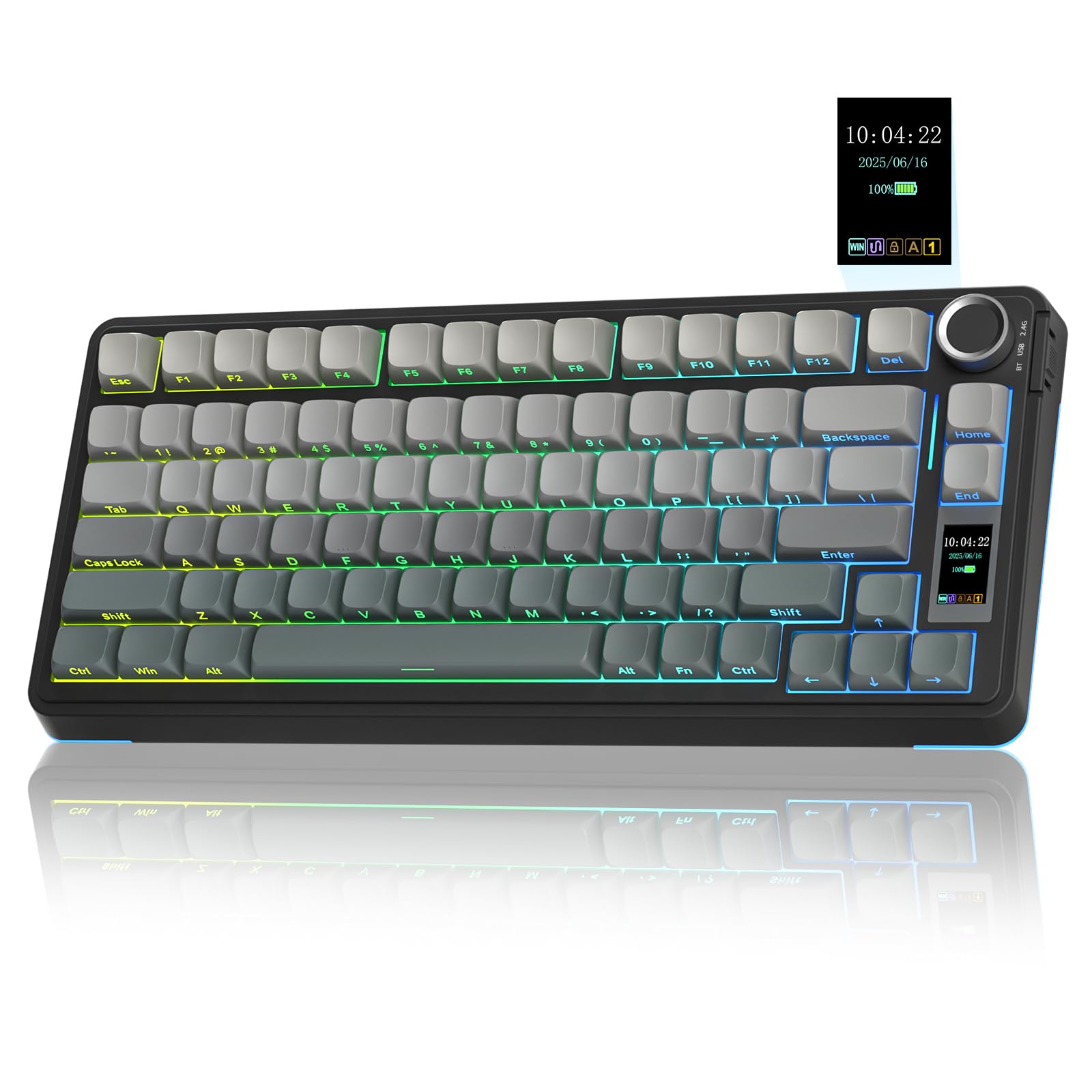
We recommend this keyboard if you want a compact, hot‑swappable board with a screen and multi‑device wireless options.
Pros
- Hot‑swappable switches let us try different switch types without soldering.
- Small 75% layout saves desk space while keeping arrow keys.
- Built‑in screen and knob give quick access to settings and lighting.
Cons
- Custom screen and GIF setup needs Windows and a wired connection.
- Software features are limited to Windows only.
- Battery life and wireless performance depend on mode and usage.
This keyboard packs many features into a compact frame. The screen and multi‑function knob make quick changes simple, and the tri‑mode wireless options help us switch between devices fast.
We like the pre‑lubed switches and the creamier sound profile that users mention. Side‑printed PBT keycaps and a solid build make the keys feel durable and pleasant to type on.
Hot‑swap support lets us personalise switches without soldering, which appeals to beginners and tinkerers. Keep in mind that full customisation and some driver features require a Windows PC and a wired setup.
For more detail or to buy, see the product page: AULA S75 Pro Wireless Mechanical Keyboard with Screen&Knob.
Womier S-K80

We think this keyboard is a strong buy for gamers who want custom lighting, a small footprint and a soft gasket-mounted feel.
Pros
- Eye-catching colour display and lots of RGB options
- Gasket mount and pre-lubed switches for quieter, cushioned typing
- Hot-swappable PCB makes switch changes easy
Cons
- Software needed for full customisation can be fiddly
- 75% layout lacks dedicated function row for some users
- May be pricier than basic compact boards
The small multimedia screen stands out and gives instant feedback on modes, volume and animations. It adds flair without taking much desk space.
We like the gasket mount and padded internals for a softer, less noisy keystroke. The pre-lubed linear switches sound clean and feel smooth from the start.
Hot-swap support lets us try different switches without soldering. That makes it a good pick if we plan to tinker or upgrade later.
Customisation through the driver covers RGB, macros and GIFs, but the app can feel clunky at first. Users who prefer plug-and-play might find that annoying.
Overall, the Womier S-K80 balances style and function for compact gaming setups and for those who enjoy personalising their keyboard.
Redragon S101M-KS Wireless Combo

We recommend this kit if you want a [budget-friendly](https://gaminggiz.blogspot.com/2025/12/Top 10 Must-Have PC Accessories for Enhanced Productivity and Performance.html), feature-packed keyboard and mouse with wireless tri-mode and RGB lighting.
Pros
- Lots of connectivity options: wired, Bluetooth, or 2.4G wireless.
- Customisable lighting and mouse DPI for different play styles.
- Includes multimedia keys and programmable options via software.
Cons
- Software can be hard to find or use for some users.
- Battery life drops quickly with RGB on.
- Mouse buttons and switches may feel inconsistent to some people.
We like the S101M-KS for the range of features you get at a low price. The tri-mode connection gives freedom to switch between devices and setups.
The RGB and programmable options let us tune lighting and DPI to suit our games. The keyboard has multimedia keys that speed up common tasks.
Some users report the software is not easy to access or stable, and RGB drains battery life fast. The mouse and key feel can vary, so expectations should match the price.
Find the product on Amazon: Redragon S101M-KS Wireless Combo
HyperX Alloy Core RGB

We recommend this keyboard for budget-conscious gamers who want solid build quality and simple RGB without extra software.
Pros
- Sturdy plastic frame that feels reliable.
- Quiet, comfortable keys good for long sessions.
- Easy RGB lighting with no software needed.
Cons
- Not a mechanical keyboard — less tactile feedback.
- Limited lighting presets compared with higher-end models.
- Basic feature set for serious competitive gamers.
We like the Alloy Core RGB because it gives useful gaming features without a big price tag. The lighting bar and six presets add style without needing extra apps.
The keys are soft and quiet, which suits mixed use for work and play. Anti-ghosting and key rollover mean multiple key presses register cleanly.
Spill resistance and dedicated media controls add practical value. If you want loud mechanical switches or deep customisation, this may feel too simple.
HyperX Alloy Origins

We recommend this keyboard if you want a compact, solid-feeling mechanical board with strong RGB and easy customisation.
Pros
- Sturdy aluminium build feels durable.
- Smooth linear HyperX Red switches suit fast gaming.
- Detachable USB-C cable and compact layout aid portability.
Cons
- Bright LEDs may be too intense for some.
- No wireless option limits desk setup flexibility.
- Software can take time to learn for full customisation.
The Alloy Origins looks and feels well built thanks to its aircraft-grade aluminium body. We like that the compact shapefrees space for wider mouse movement.
Switches balance actuation and travel for quick, consistent keystrokes. Per-key RGB and exposed LEDs create vivid lighting that stands out in dark rooms.
HyperX NGENUITY software lets us tweak lighting, record macros and save profiles, though some users may find the app a bit fiddly at first. The detachable USB-C cable makes it easy to move between setups.
Overall, this keyboard suits gamers who want a reliable wired mechanical board with strong lighting and a small footprint.
Buying Guide
We look for switches first because they shape typing feel and gaming response. Mechanical switches give crisp feedback and faster actuation. Membrane switches are quieter and cheaper.
We check build quality next. A sturdy frame and good keycaps last longer. Metal plates and PBT keycaps resist wear.
We value ergonomics and layout for long sessions. Compact layouts save desk space, while full-size boards add a number pad. Adjustable feet and wrist rests reduce strain.
We consider connectivity and extras. Wired gives the lowest latency. Wireless offers tidy setups and battery life varies. Backlighting helps in low light; RGB is cosmetic but programmable lighting can highlight keys.
We pay attention to features that matter in play. Anti-ghosting and N-key rollover ensure every keypress registers. Dedicated macro keys and profiles let us tailor controls for different games.
We compare software and customisation. Good software should let us remap keys, create macros, and save profiles easily. Onboard memory is useful for using profiles without a PC.
We set a budget and prioritise features. Decide which specs affect our play most, then balance price with durability and comfort.
| Feature | Why it matters |
|---|---|
| Switch type | Feels and actuation speed |
| Build & keycaps | Durability and feel |
| Layout & ergonomics | Comfort and space |
| Connectivity | Latency and convenience |
| Customisation | Control and personalisation |
| Anti-ghosting/N-key | Reliable key registration |
Frequently Asked Questions
We cover key choices like switches, size, connection type, and build. We also list top keyboard-and-mouse pairs and give tips for buying a solid keyboard without spending much.
What factors should be considered when choosing a gaming keyboard?
We look at switch type, key feel, and actuation force because these affect speed and comfort.
We check size — full, tenkeyless (TKL) or compact — to match desk space and gaming style.
We also consider build quality, key rollover/N-key rollover, and anti-ghosting for reliable input.
Which features differentiate a mechanical gaming keyboard from others?
We note mechanical keyboards use individual switches under each key, giving consistent feedback and durability.
They offer swapable switches on some models, letting us customise feel and sound.
Mechanical boards usually last longer and support better key rollover than membrane keyboards.
What are the advantages of a wireless gaming keyboard over a wired one?
We value desk tidiness and freedom of movement with wireless keyboards.
Low-latency wireless tech can match wired performance on modern models.
We must check battery life and charging method to avoid interruptions during play.
How does the choice of a gaming keyboard impact performance in games like Fortnite?
Switch type and actuation distance affect build and edit speed in Fortnite.
A TKL or compact board can free mouse space for wide flicks and faster aiming.
Reliable anti-ghosting and fast polling rate reduce missed inputs in tense fights.
What are some highly recommended gaming keyboard and mouse combinations?
We recommend pairing a tactile mechanical TKL keyboard with a lightweight gaming mouse for FPS games.
For MMOs, we suggest a full-size keyboard with macro keys and a mouse with extra buttons.
Popular combos include a hot-swappable TKL board plus a high-DPI optical mouse for balance and control.
How can one select a high-quality gaming keyboard on a budget?
We search for entry-level mechanical keyboards with Outemu, Gateron, or Kailh switches for good value.
Prioritise a solid frame, anti-ghosting, and at least 6-key rollover if full N-key rollover is too costly.
Look for sales, refurbished units, or last-year models to get better specs for less money.


